Скрин:
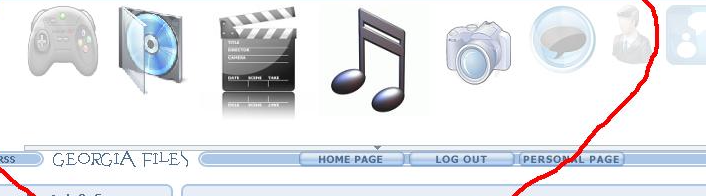
Вот код:
В CSS:
Code
a img.MenuImg {border: 0px none; }
В то место где хотите увидеть меню:
Code
<script src="http://free-manga.net.ru/scripts/jquery-1.2.6.js"></script>
<STYLE>* {border: 0px none; }a img.MenuImg {border: 0px none; }</STYLE>
<DIV id="TheMenu"></DIV>
<script>
Icons = ['http://geofiles.at.ua/flash_menu/games.png', 'http://geofiles.at.ua/flash_menu/soft.png', 'http://geofiles.at.ua/flash_menu/video.jpg' 'http://geofiles.at.ua/flash_menu/music.jpg', 'http://geofiles.at.ua/flash_menu/foto.jpg', 'http://geofiles.at.ua/flash_menu/forum.jpg', 'http://geofiles.at.ua/flash_menu/host.png', 'http://geofiles.at.ua/flash_menu/chat.png']; // меняем на URL картинок
URLs = ['http://geofiles.at.ua/load/2', 'http://geofiles.at.ua/load/1', 'http://geofiles.at.ua/load/4', 'http://geofiles.at.ua/load/3', 'http://geofiles.at.ua/photo/', 'http://geofiles.at.ua/forum/', 'http://geofiles.at.ua/gb/', 'http://geofiles.at.ua/mchat']; // меняем на ссылки
Orientation = 'h'; // h - горизонтальное меню, v - вертикальное
Heights = [128, 100, 80, 60]; // высоты элементов, нулевой элемент - высота элемента над которым курсор, следующие значения - высоты соседних элементов
Opacities = [1.0, 0.8, 0.4, 0.15]; // то же что и выше, только здесь прозрачность
MenuAlign = 'center'; // выравнивание всего меню
VAlign = 'top'; // вертикальное выравнивание картинок в меню top, bottom (для гор. меню)
HAlign = 'center'; // горизонтальное выравнивание right, left (для верт. меню)
Speed = 250; // скорость
MenuCode = '<table id="MenuTable" style="height: ' + (Heights[0] - - 10) + 'px; ">';
if (Orientation === 'h') {
MenuCode += '<tr>';
for (i = 0; i < Icons.length; i++) {
MenuCode += '<td valign="' + VAlign + '"><a href="' + URLs[i] + '"><img style="height: ' + Heights[Heights.length - 1] + 'px; " src="' + Icons[i] + '" class="MenuImg"></a></td>';
}
MenuCode += '</tr>';
} else {
for (i = 0; i < Icons.length; i++) {
MenuCode += '<tr><td align="' + HAlign + '"><a href="' + URLs[i] + '"><img style="height: ' + Heights[Heights.length - 1] + 'px; " src="' + Icons[i] + '" class="MenuImg"></td></a></tr>';
}
}
MenuCode += '</table>';
$('#TheMenu').html(MenuCode).attr('align', MenuAlign);
$('img.MenuImg').animate({height: Heights[Heights.length - 1] + "px", opacity: Opacities[Opacities.length - 1]}, 1).each(function (j) {
jQuery(this).hover(function () {
$('img.MenuImg').stop();
for (i = 0; i < $('img.MenuImg').length; i++) {
jQuery('img.MenuImg:eq(' + i + ')').animate({height: (Math.abs(i - j) < Heights.length ? Heights[Math.abs(i - j)] + "px" : Heights[Heights.length - 1] + "px"), opacity: (Math.abs(i - j) < Opacities.length ? Opacities[Math.abs(i - j)] : Opacities[Opacities.length - 1])}, Speed);
}
}, function () {
});
});
$('#MenuTable').hover(function () {
}, function () {
$('img.MenuImg').stop().animate({height: Heights [Heights.length - 1] + "px", opacity: Opacities[Opacities.length - 1]}, Speed);
});
</script>
Ссылки меняем на свои, если хотите картинки тоже.